The right receipt. The right destination.
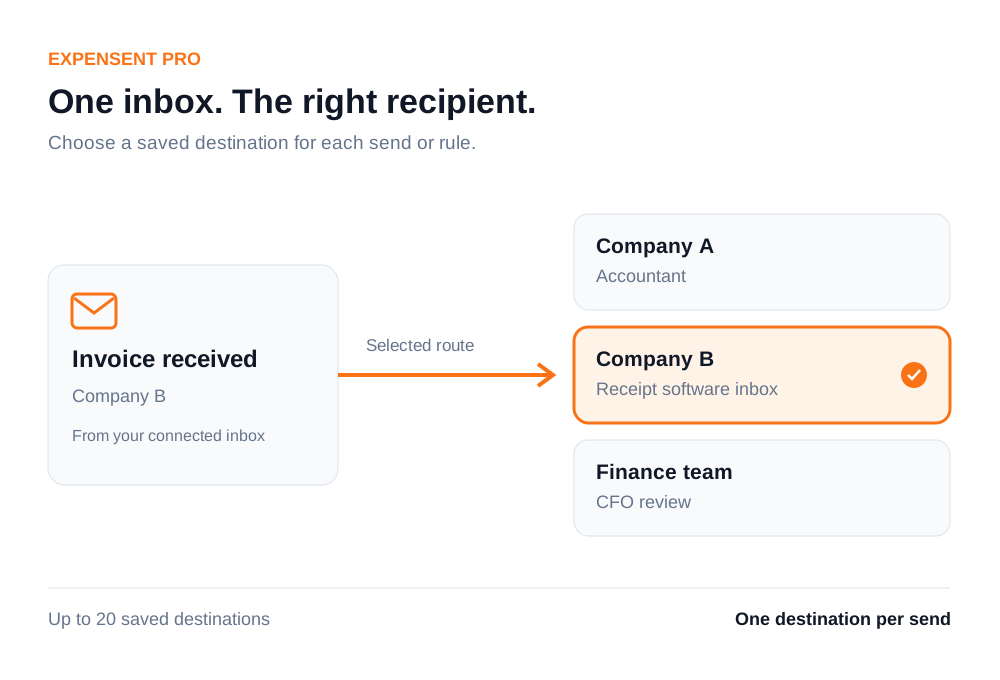
One inbox can receive invoices for several companies. With invoice routing on Expensent Pro, save their accountants, software addresses, or team inboxes and choose where each document goes. Approved rules keep recurring invoices moving to the right destination.
- Up to 20 saved destinations, including your default address
- Choose a destination for each forward, or set one on an automatic rule
- Included in existing Pro subscriptions without a plan change
How it works
- 1
Save the addresses you need
Start with one default destination during onboarding. In Settings, add a name and email address for each company, accountant, software inbox, or team.
- 2
Choose where to send
The destination appears beside Forward. Select an address before sending. Other emails from the same sender and subject pattern that you add to the send go there too.
- 3
Automate recurring handoffs
Assign a destination to a rule for a recurring sender and subject pattern. The next time that invoice arrives, it goes to that destination without another manual forward.
Route documents around your business
Several companies, one inbox
Send one company's invoices to its accountant and another company's receipts to a different software inbox, even when both arrive in the same connected inbox.
Different teams and responsibilities
Route an invoice to accounting, a financial document to legal, or a receipt to a CFO inbox. Each send has one selected destination; CC remains a separate choice.
Choose across your workflow
Use saved destinations when forwarding email, uploading a receipt, resending a document, or sending files added to a reminder.
Clear recurring rules
Use distinct sender and subject patterns for different routes. When two companies' emails look identical, choose the destination manually instead of creating an ambiguous rule.
Guides & integrations
Keep exploring
Auto-Forwarding Rules
Turn a recurring receipt into a one-click rule, so the next one forwards itself.
Action Center
Your invoice to-do list — review and forward to your accounting software from one queue.
Connected Inboxes
Link Gmail, Outlook, iCloud, and IMAP inboxes, then work likely receipts from one place.
Common questions
Which plan includes invoice routing?
Pro includes invoice routing with up to 20 saved destinations, including the default address. Existing Pro subscribers have access without changing plans. Solo includes one default destination.
Can one invoice go to more than one destination?
Yes, one send at a time. Each forward or automatic rule goes to one destination, including any emails from the same sender and subject pattern that you add to that send. To send the same invoice somewhere else, resend it from Already Sent in Action Center and choose another destination. Use CC when someone needs a copy of the same send.
Does Expensent automatically identify which company owns an invoice?
Invoice routing follows your selection or a rule you configure. Rules match sender and subject patterns. If those cannot distinguish the companies, choose the destination manually.
Is invoice routing an approval workflow?
No. Invoice routing chooses where Expensent forwards each receipt or invoice. Approvals and payments stay in your accounting software or with your accountant.
What happens if I move from Pro to Solo?
Your saved addresses are kept, but additional destinations require Pro. Future automatic matches that need an additional destination wait in Action Center. You can choose the default destination or return to Pro; emails are never silently redirected.